🤓 Reversing FLP format#
You should first take a look at what events are. A decent knowledge of the topics mentioned there as well as Python itself is assumed.
One could use a hex editor, but its too tedious. I have a simpler solution:
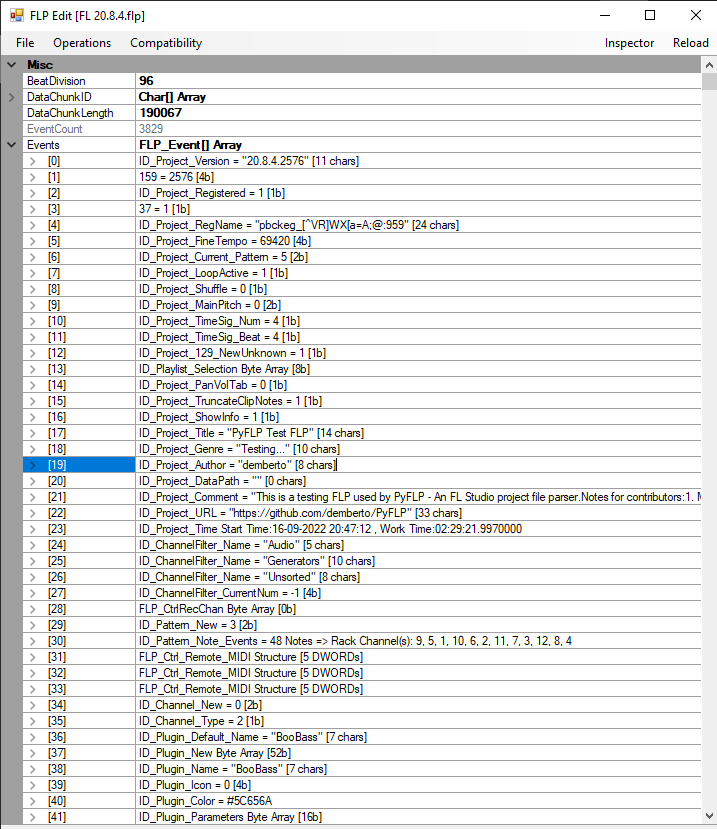
FLPEdit, an event view for FLP (and related formats) files.#
Download it here.
This is an unmaintained software, written actually in C#. Event ID names are
different but the file attached above has source code as well. Check the
FLPFileFormat/FLP_File.cs file for a list of event IDs and compare them
to the ones from pyflp._events.EventEnum in PyFLP.
Events#
Which event needs to be inspected can only be understood when you observe the ordering of events, whether they occur for default values or not as well as a general knowledge of new features and changes occuring inside FL Studio.
Check this discussion for a list of unknown / undiscovered events.
Struct fields#
Structs whose field names are prefixed with a _u are undiscovered fields.
Wherever possible, I have added helpful comments right next to them.
Also, throughout PyFLP’s codebase, there are a number of # TODO comments.
Some of these can have additional information about them.
My workflow#
Create a new test FLP or a preset and save it.
Parse the file with PyFLP and record the initial values.
Turn knobs / faders all the way to their extremes, save and repeat (2)
Hint
WhatsNew.rtf
FL Studio’s changelog file WhatsNew.rtf exists in its install folder.
It is a very helpful source for understanding which features were added
when.